
New Tab Pinboard
Replace the empty new tab with a structured board for recurring links and workflows.
Pinus Maximus v1.0.2
Max out your pins
Pinus Maximus turns the browser’s new tab page into an organized workspace with screens, groups, folders, configurable search and AI chat services, icons, and backgrounds.
Pinus Maximus means “largest pine” or “giant pine.” The name is also a playful reference to getting the most out of pinning. The pine motif also shapes the extension’s color palette and visual atmosphere.
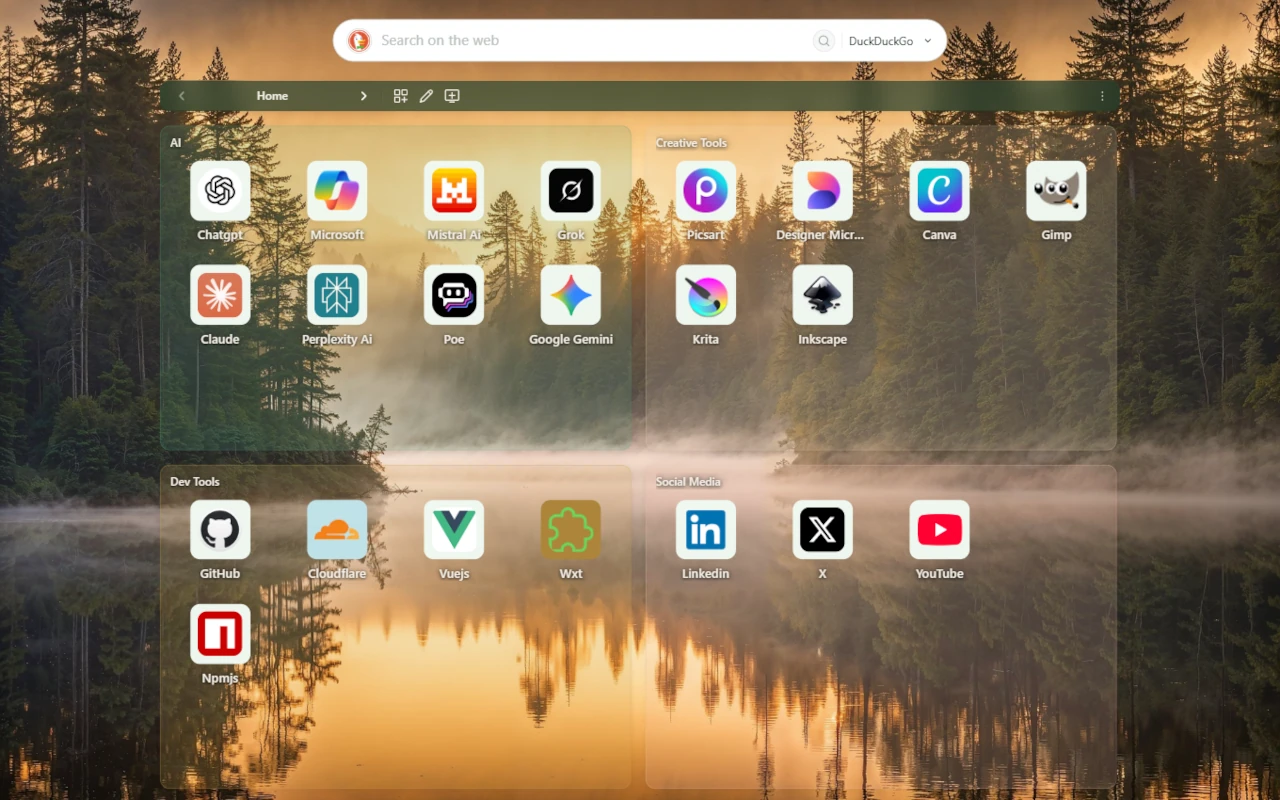 Screenshot selected: Screens and groups
Features
Pinus Maximus tools help you organize links, launch searches, configure providers, manage backups, and use local-first workflows with clear control.
Replace the empty new tab with a structured board for recurring links and workflows.
Separate personal, work, research, learning, or project contexts into focused screens.
Group related items together so a large link collection stays scan-friendly.
Select multiple pinboard items, then delete, move, or apply one shared icon background action.
Reorder items or move them between same-screen groups with previews before the drop is saved.
Create folder items that contain their own groups and saved items, then open them as focused mini-boards.
Configure search URL patterns and launch queries from the same new-tab surface.
Open a configured AI chat provider URL when you choose to send a query there.
Tune appearance, layout, screens, backgrounds, and the way the pinboard behaves.
Use direct lookup, provider lookup, manual upload, and color choices for clear visual anchors.
Represent folders visually while keeping contained groups and items organized.
Core extension data is stored in browser IndexedDB, not in a Pinus Maximus cloud account.
Move or back up data with user-controlled export and import flows.
Inspect extension activity around lifecycle, outgoing calls, and data normalization.
Use custom background images and rotation options for a more personal start page.
Tutorials
Guides in video, Help, and FAQ formats.
Downloads
Use the Chrome Web Store package for Chromium-based browsers and the Firefox Add-ons package for Firefox-based browsers. The extension is 100% free.
 English poster selected
Extension legal documents
These are not the website legal documents. They are extension document copies shown so you can review them before installation. The extension version you install may have different bundled documents; the bundled documents for that installed version apply. The original English text prevails, and translations are informational.
Use the Chrome Web Store package. Examples only; other compatible Chromium-based browsers may also work.
Use the Firefox Add-ons package. Examples only; other compatible Firefox-based browsers may also work.
Assets
Use these pages for practical tips on finding search providers, icon providers, and background sources for the extension.